

Combustion turbine startup problems show up in the data on every start, often long before they cause a trip. The usual suspects are uneven light-off, crossfire trouble, fuel split issues, and wide exhaust temperature spread. Most monitoring tools miss them because they only model steady-state operation.
That’s a costly blind spot. A start is when a combustion turbine takes the most thermal punishment of its day. A trip during startup burns fuel, adds wear, and can cost you a dispatch window. Even when a startup doesn’t trip, repeatable startup problems can accelerate wear and increase costly maintenance.
This post walks through why startups are so hard on the machine and which problems show up most often. Then we look at a real startup catch, how to compare one start to the next, and a checklist for your own data.
Key Takeaways
- Startup is the most stressful part of a combustion turbine’s operating cycle. Frequent starts and stops cause thermal cycling damage that speeds up mechanical wear.
- Common combustion turbine startup problems include uneven light-off, crossfire problems between combustors, fuel split maldistribution, and high exhaust temperature spread.
- Steady-state monitoring models are usually inactive or out of range during startup, so startup symptoms often go unwatched.
- Comparing each start against known-good starts, and against sister units, separates real combustion problems from bad thermocouples.
- A repeatable exhaust thermocouple lag that clears at full speed usually points to localized combustion hardware, not a failing sensor.
Why Startup Is the Hardest Part of a Combustion Turbine's Day
In a few minutes, a combustion turbine goes from cold metal to firing temperature. Hot gas path parts heat unevenly. Thick sections lag thin ones. Clearances change as the rotor and casing grow at different rates.
That’s a recipe for fatigue. U.S. EPA documents reinforce that frequent starts and stops cause damage from thermal cycling, which accelerates mechanical failure.
Now add today’s dispatch reality. Many units that were designed for long, steady runs now start far more often to follow renewables and demand. More starts means more chances for something to go wrong, and more opportunities to catch it if anyone is watching.
Common Combustion Turbine Startup Problems
Most startup issues trace back to how evenly fuel and flame are distributed across the combustors. Here’s what each common problem looks like in the data.
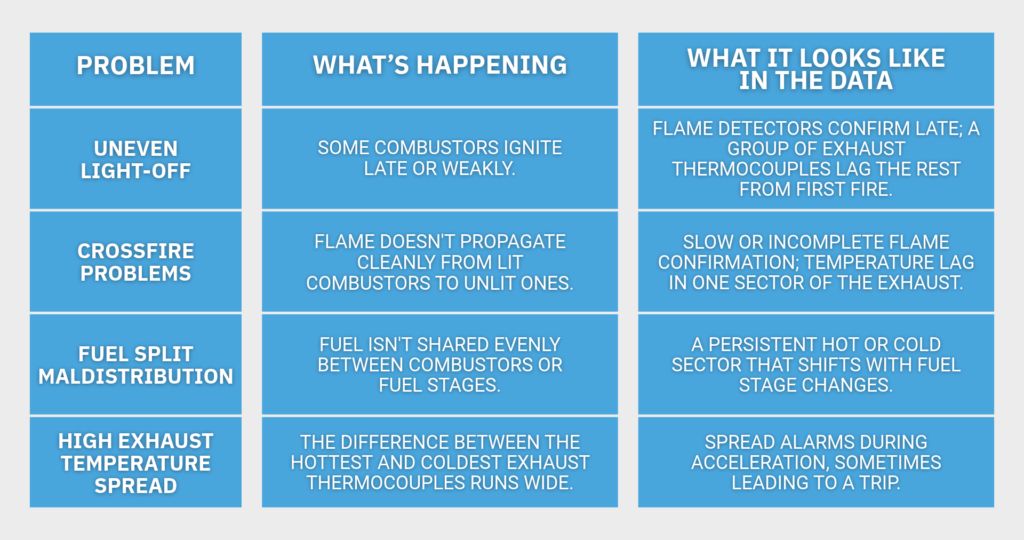
Exhaust temperature spread is often the first visible symptom of all four. Each combustor heats a specific slice of the exhaust. So a cold or hot spot in the exhaust ring points back toward a specific region of the combustion system. That’s what makes the exhaust thermocouples such a useful diagnostic tool, if you know how to read them during a start.
Why Steady-State Monitoring Goes Quiet During Startup
Most monitoring programs use advanced pattern recognition (APR), which learns how equipment behaves during normal, steady operation. That works well at load. During a start, though, speed, flows, and temperatures change every second. A steady-state model has nothing to compare against.
So in many plants, the APR models are switched off or ignored until the unit reaches a stable operating point. The result is a monitoring program with a gap right where the stress is highest. Startup problems get discovered the hard way, as a trip, a failed start, or a hot gas path inspection finding.
Closing that gap takes a different kind of model, one built for transient monitoring.
A Real Startup Catch: Exhaust Thermocouples 400°F Behind Their Peers
Here’s what that looks like in practice, from a fleet of identical large gas turbines monitored with ECG’s software.
The situation. The fleet’s startups were being monitored automatically, with every start compared against healthy starts and against the other units in the fleet.
What was flagged. On one unit, a cluster of exhaust thermocouple channels ran up to 400°F behind their peers from first fire through roll-up. The same channels lagged on repeated starts. Then, once the unit reached speed, they converged with the rest.
How it was found. Nobody had to trend it by hand. The software flagged it on an exception basis by comparing the unit against eight sister units.
Sensor or combustion? That’s always the first question. A failing thermocouple would usually misbehave at any speed. These channels read normally once the unit was up to speed. Combustion spread on this unit also ran well above its eight peers early in the start, then fell back in line. The pattern was repeatable, confined to one sector, and cleared as airflow increased.
The likely cause. The engineering team’s working hypothesis was localized combustion trouble in that sector. The likely culprits were uneven light-off, a crossfire issue, or fuel split maldistribution, probably tied to combustor or fuel nozzle hardware. As airflow rises during acceleration, mixing improves and the lagging combustors catch up.
The lesson. This unit wasn’t tripping, so the problem was invisible at load. It only showed up in startup data, and only when someone compared starts systematically.
How Predict-It Compares Every Startup to a Healthy One
ECG’s Pathway module, part of Predict-It, monitors startups with a simple idea. Instead of judging each reading against a fixed limit, it judges each start against starts you know were healthy. Here’s how it works.
- Define the event. A trigger, such as turbine speed, marks when a start begins and when it ends. Every start becomes a comparable event.
- Train on golden starts. Engineers select known-good starts. These golden starts teach the model what a healthy start looks like.
- Sample fast. Startup data is captured at intervals as short as one second, so fast-moving problems aren’t averaged away.
- Line up starts of different lengths. No two starts take exactly the same time. A technique called dynamic time warping aligns them, so a slow start isn’t flagged just for being slow.
- Report by exception. A start report shows which starts need a look and which variables drove the alert. Healthy starts stay out of the way.
Pathway used this same approach to catch a steam turbine bearing problem more than nine months before failure. The warning sat in shutdown data a steady-state tool missed. ECG introduced Pathway publicly in a webinar on startup and shutdown analysis.
What to Look for in Your Own Startup Data: A Checklist
You can start looking for startup problems with the data already in your historian. Pull a handful of recent starts and check the following:
- Neighbors, not just limits. Compare each exhaust thermocouple against the ones beside it, not only against the spread alarm.
- Sister units. If you run identical units, compare the same channel across the fleet during the same phase of the start.
- The whole start. Track exhaust spread from first fire through roll-up, not just at base load.
- Repeat offenders. Look for channels that lag on every start, then converge at speed. Repeatable patterns are rarely random.
- A known-good overlay. Plot recent starts on top of a start you know was healthy.
- Sensor or sector. Check whether a pattern follows one thermocouple or a group of neighbors. A lone outlier suggests an instrument. A neighborhood suggests combustion.
Freqently Asked Questions
High exhaust temperature spread on startup usually comes from uneven combustion across the combustors. Common causes include late or uneven light-off, poor crossfire between combustors, and fuel split maldistribution from worn or plugged fuel nozzles. Each combustor heats its own slice of the exhaust. A hot or cold sector in the exhaust thermocouples points back toward the region that needs attention.
Look at the pattern. A failing thermocouple usually misbehaves alone and at any speed or load. A combustion problem typically affects a group of neighboring thermocouples, repeats on every start, and often clears as airflow rises at higher speed. Comparing the same channels against sister units during the same phase of the start makes the difference much easier to see.
Common reasons combustion turbines trip during startup include failed or uneven light-off, high exhaust temperature spread, flame loss during fuel transfers, and protective limits reached while temperatures change quickly. Startup is the most thermally stressful phase of operation. Small hardware problems that are invisible at full load can push the unit past a trip limit.
Standard APR software is built for steady-state operation, so it usually can’t judge startups well. Speeds, flows, and temperatures change too quickly for a steady-state model. Startup monitoring needs transient models. They treat each start as an event, train on known-good starts, sample data every few seconds, and align starts of different lengths before comparing them.
There isn’t a fixed number. It depends on how consistent a unit’s starts are and how many startup modes it uses, such as hot, warm, and cold starts. Engineers build the baseline from known-good starts they select and review. Units with very consistent starts need fewer examples, while units with varied starting conditions need more to represent each mode.
Start Watching Your Starts
Combustion turbine startup problems leave fingerprints in your data on every start. Lagging thermocouples, wide spread, and late light-off are all visible long before a trip, if your monitoring is watching when the unit is starting. Most steady-state tools aren’t.
ECG’s Predict-It Pathway module compares every start against healthy ones and flags the ones worth a look, on the historian you already run. If you’d like a second set of eyes on your own startup data, ask us about your units and talk to an engineer.